Showing posts with label Voip. Show all posts

Monday, 23 December 2019

Asterisk on Mikrotik

image

I wondered about the idea to raise a voip on mikrotik. Who remembers, in older versions of the routeros there was a module for voip, then it was cut out, which is a pity. It is no longer possible to raise an asterisk on the routeros, however there is an opportunity to raise a virtual router with openwrt in the metarouter mode, from here we will proceed.

Long searches led me to the openwrt.wk.cz website (available only via ipv6), from where the openwrt image for mt-mips was downloaded. All experiments conducted on the 2011UAS-2HnD. Since not everyone has ipv6, I made a mirror for installing packages from it ( ms1.nserver.us/openwrt.wk.cz .), Where the necessary packages lie. By the way, during the search, it was not possible to find a full-fledged article on this topic, not only in Russian, but also in any other.

So, download the image for mips ( openwrt-mr-mips-rootfs.tar.gz ) or for ppc ( openwrt-mr-ppc-rootfs.tar.gz ). Fill the image in our mikrotik, in Files, go to MetaROUTER and do the import of the image. I allocated 48 meters of memory and 24 meters of hdd, yes ... yes ... do not be surprised ... an asterisk will work on such hardware, tested, created trunks and made calls without problems.


 We add the interface to the virtual router, the easiest way is to create a dynamic one and add it to your local bridge. It looks like this to me:


 in the preinstalled image, the network interface is configured to receive network settings via dhcp, and if you have everything in order with the localhost, the virtual router will get the network address, if not, edit the / etc / config / network file and restart the network. Next, go to the console:


 change the password to root, and see what address is received. All subsequent actions are best done by connecting via ssh.

Having connected via ssh, first edit /etc/opkg.conf, bringing it to the following form for mips:


 Further:

opkg update
opkg install asterisk18 asterisk18-codec-alaw asterisk18-chan-iax2 asterisk-gui
/etc/init.d/asterisk enable


edit /etc/asterisk/manager.conf, change the admin password to the panel and start the asterisk

/etc/init.d/asterisk start


that's all, now you can go to metarouter_address : 8088 / and set up an asterisk through the GUI. Present codecs alaw, ulaw, gsm. If you need to add codecs, look at the list of existing packages and install the necessary one via opkg. Ready packages under 1.8 asterisk a decent amount, up to chan_dahdi. For home use quite tolerably can work.


 Everything was done as an experiment, although in principle, it could work for the house, and you can not install the GUI for an asterisk.

PS: I understand perfectly well that this is a perversion, but I wanted to share such an experiment.

Source : https://weekly-geekly.github.io/articles/180889/index.html


Wednesday, 27 November 2013

Membuat IVR (interactive voice responses) di Asterisk

1. merekam suara IVR dengan menggunakan software pengolah suara, misalnya : audacity
download audacity http://audacity.sourceforge.net/download/
misal suaranya berbunyi :
“selamat datang di layanan voip UBS, tekan nomer extention yang anda inginkan atau
tekan 9002 untuk mengetahui jam saat ini
tekan 9003 untuk mendengarkan lagu yogya
tekan 9004 untuk bantuan operator
tekan 9005 untuk Cabang A
tekan 9006 untuk Cabang B “
2. simpan dalam format .wav (dalam contoh ivr.wav)

3. lakukan konversi suara ke format .gsm (dalam contoh ivr.gsm), dengan menggunakan software sox [saya menggunakan yang versi linux]
a. download software sox
http://sourceforge.net/projects/sox/files/sox/14.3.0/sox-14.3.0.tar.gz/download
b. configure
# cd /usr/local/src/
# tar xvzf sox-14.3.0.tar.gz
# cd sox-14.3.0
# ./configure
c.lakukan konversi
# sox ivr.wav -r 8000 -c1 ivr.gsm resample -ql
d. untuk convert sekumpulan mp3 ke gsm
# vi mp32gsm
for I in $(ls -1 *.mp3)
do
NAME=$I
echo “Converting from mp3.wav”
mpg123 -w “$NAME.wav” “$NAME”
echo “Converting from wav to gsm”
sox -t wav “$NAME.wav” -r 8000 -c1 -t gsm “$NAME.gsm” resample -ql
echo “output filename: $NAME.gsm”
done
# chmod a+x mp32gsm
# ./mp32gsm
4. hasil konversi disimpan ke /var/lib/asterisk/sounds
# cp ivr01.gsm /var/lib/asterisk/sounds/
ASTERISK
5. melakukan konfigurasi extension.conf
# vi /etc/asterisk/extensions.conf
;————————–
; ivr
;————————–
Exten => 001,1,Answer()
Exten => 001,2,Background(ivr)
exten => 001,3,Background(silence/3)
exten => 001,4,Goto(2)
artinya :
baris 1 : jika ada user mendial 001 maka prioritas pertama adalah dijawab
baris 2 : jika tidak dijawab akan ada suara rekaman ‘ivr’ kita yang bunyinya seperti diatas
baris 3 : silence selama 3 dial tone
baris 4 : ulangi ke baris 2
6. reload asterisk
# asterisk -vvvr
linux*CLI> reload
linux*CLI> exit

Source : http://setijoagus.wordpress.com/2009/08/26/membuat-ivr-interactive-voice-responses-di-asterisk/

Sunday, 6 October 2013

How to Install Asterisk 11 in RHEL/CentOS/Fedora and Ubuntu/Debian/Linux Mint

Asterisk is an Open Source software PBX (Private Branch Exchange), developed by Mark Specer of Digium. It allows you to make calls to one another which may have connected to other PSTN (Public Switched Telephone Network) and Voice over Internet Protocol (VoIP). Asterisk runs on Linux, BSD, MacOSX and others. Having built-in features like voicemail, conferencing, IVR, queuing etc.
In this article, we are going to see a basic installation and working of Asterisk 11 in RHEL 6.4/6.3/6.2/6.1/6.0, CentOS 6.4/6.3/6.2/6.1/6.0, Fedora 18,17,16, Ubuntu 12.10/12.04/11.10, Linux Mint 14/13 and Debian Linux Operating Systems.

1. Preparation for Installation

First, you make sure that your system is up-to-date, if not try to update the system and then install dependencies packages using “yum command” and “apt-get command“, before installing Asterisk on your system.
On RHEL/CentOS/Fedora
# yum -y update
# yum install -y make wget openssl-devel ncurses-devel newt-devel libxml2-devel kernel-devel gcc gcc-c++ sqlite-devel
Turn Off SELinux by changing the line “enforcing” to “disabled” in /etc/selinux/config file.
SELINUX=disabled
Once you disabled SELinux, you need to reboot the system.
reboot
On Ubuntu / Linux Mint / Debian
# su root
# apt-get update && apt-get upgrade -y && reboot
# apt-get install build-essential wget libssl-dev libncurses5-dev libnewt-dev  libxml2-dev linux-headers-$(uname -r) libsqlite3-dev

2. Downloading DAHDI, LibPRI and Asterisk Tarballs

Download the source tarballs, these following commands will download current release of DAHDI 2.6, LibPRI 1.4 and Asterisk 11.
# cd /usr/src/
# wget http://downloads.asterisk.org/pub/telephony/libpri/libpri-1.4-current.tar.gz
# wget http://downloads.asterisk.org/pub/telephony/dahdi-linux-complete/dahdi-linux-complete-current.tar.gz
# wget http://downloads.asterisk.org/pub/telephony/asterisk/asterisk-11-current.tar.gz
Next, extract the files from source tarballs using “tar command” as shown below.
# tar zxvf dahdi-linux-complete-current.tar.gz
# tar zxvf libpri-1.4-current.tar.gz
# tar zxvf asterisk-11-current.tar.gz

3. Configuring, Compiling And Installing

Go to the each directory from where you have downloaded and extracted the packages and start running the following commands to install DAHDI, LibPRI and Asterisk.
Installing DAHDI.
# cd /usr/src/dahdi-linux-complete-2.6.2+2.6.2/
# make && make install && make config
Installing LibPRI
# cd /usr/src/libpri-1.4.14/
# make && make install
Installing Asterisk
Next, run the “configure” script will vary depending upon whether your system is 32-bit or 64-bit. In the middle, when “menuselect” command executes, select your desired options and then hit “Save and Exit” option and the installation will continuous.
Run this command if you’re installing Asterisk on a 32-bit OS.
# cd /usr/src/asterisk-11.3.0/
# ./configure && make menuselect && make && make install && make samples && make config
Run this command if you’re installing Asterisk on a 64-bit OS.
# cd /usr/src/asterisk-11.3.0/
# ./configure --libdir=/usr/lib64 && make menuselect && make && make install && make samples && make config
Following are the some Asterisk configuration files and their locations.
  1. /etc/asterisk/ – configuration files.
  2. /var/lib/asterisk/ – contains images, firmware, keys, sounds sample files.
  3. /usr/lib/asterisk/modules/ – contains all loadable modules.

4. Starting DAHDI and Asterisk Services

Enable the DAHDI and Asterisk services at system boot time.
# chkconfig dahdi on
# chkconfig asterisk on
Start the DAHDI and Asterisk.
# service dahdi start
# service asterisk start

5. Connecting to Asterisk CLI

Run the following command to connect to the Asterisk CLI.
# asterisk -rvvvvv

Asterisk 11.3.0, Copyright (C) 1999 - 2012 Digium, Inc. and others.
Created by Mark Spencer <markster@digium.com>
Asterisk comes with ABSOLUTELY NO WARRANTY; type 'core show warranty' for details.
This is free software, with components licensed under the GNU General Public
License version 2 and other licenses; you are welcome to redistribute it under
certain conditions. Type 'core show license' for details.
=========================================================================
Connected to Asterisk 11.3.0 currently running on tecmint (pid = 1820)
tecmint*CLI>

6. Asterisk Console Commands

It’s similar to IOS. From Asterisk terminal anytime you can use ‘Tab key‘ or type ‘?‘ for help or command auto complete.
tecmint*CLI>
!              acl            ael            agent          agi            aoc            
calendar       cc
cdr            cel            channel        cli            confbridge     config         
console        core
data           database       devstate       dialplan       dnsmgr         dundi          
event          fax
features       file           group          hangup         help           http           
iax2           indication
local          logger         manager        mgcp           minivm         mixmonitor     
module         moh
no             originate      parkedcalls    phoneprov      presencestate  pri            
queue          realtime
reload         rtcp           rtp            say            sip            skinny         
stun           timing
udptl          ulimit         unistim        voicemail

7. Useful Commands from Asterisk CLI

  1. restart gracefully – Restart Asterisk gracefully.
  2. restart now – Restart immediately.
  3. restart when convenient – Restart Asterisk when call is empty.
  4. reload – Configuration reload.
  5. stop gracefully – Gracefully Asterisk shutdown.
  6. stop now – Shutdown immediately.
  7. stop when convenient – Shutdown Asterisk when call is empty.

8. Command Line Parameters

Following are the available command line parameters of Asterisk.
-h : Help. Run '/sbin/asterisk -h' to get a list of the available command line parameters.
-C <configfile>: Starts Asterisk with a different configuration file than the default /etc/asterisk/asterisk.conf.
-f : Foreground. Starts Asterisk but does not fork as a background daemon.
-c : Enables console mode. Starts Asterisk in the foreground (implies -f), with a console command line interface (CLI) that can be used to issue commands and view the state of the system.
-r : Remote console. Starts a CLI console which connects to an instance of Asterisk already running on this machine as a background daemon.
-R : Remote console. Starts a CLI console which connects to an instance of Asterisk already running on this machine as a background daemon and attempts to reconnect if disconnected.
-t : Record soundfiles in /var/tmp and move them where they belong after they are done.
-T : Display the time in "Mmm dd hh:mm:ss" format for each line of output to the CLI.
-n : Disable console colorization (for use with -c or -r)
-i: Prompt for cryptographic initialization passcodes at startup.
-p : Run as pseudo-realtime thread. Run with a real-time priority. (Whatever that means.)
-q : Quiet mode (supress output)
-v : Increase verbosity (multiple v's = more verbose)
-V : Display version number and exit.
-d : Enable extra debugging across all modules.
-g : Makes Asterisk dump core in the case of a segmentation violation.
-G <group> : Run as a group other than the caller.
-U <user> : Run as a user other than the caller
-x <cmd> : Execute command <cmd> (only valid with -r)

9. Reference Link

  1. http://www.asterisk.org/
Source : http://www.tecmint.com/how-to-install-asterisk-11-in-linux-distributions/

How to Install Asterisk-GUI

After I try to install asterisk on my previous writings, it seems so hard to configure with CLI. However i’m just a newbie…remember that. So, I’m trying to find an easy way to configure using ‘Asterisk-gui’. actually there are many third-party applications developed for asterisk, such as pbxware, asterisk now, freepbx, briker, etc. asterisk-gui is a web interface, it’s just like you have installing a trixbox on your own.
Here is step by step installation:
1. Go to your installation directory (for example: /usr/src), download the latest version:
[root@gembul ~]# cd /usr/src/
[root@gembul src]# svn checkout http://svn.digium.com/svn/asterisk-gui/trunk asterisk-gui

this is will create directory named asterisk-gui

2. Enter asterisk-gui directory, compile and install:
[root@gembul asterisk-gui]# ./configure
checking build system type... x86_64-unknown-linux-gnu
checking host system type... x86_64-unknown-linux-gnu
checking for uname... /bin/uname
checking for gcc... gcc
##################################### skipped #####################################
configure: Package configured for:
configure: OS type : linux-gnu
configure: Host CPU : x86_64

[root@gembul asterisk-gui]# make && make install
##################################### skipped #####################################
+------- Asterisk-GUI Build Complete -------+
+ Asterisk-GUI has successfully been built, +
+ and can be installed by running: +
+ +
+ make install +
+-------------------------------------------+
+---- Asterisk GUI Installation Complete ---+
+ +
+ YOU MUST READ THE SECURITY DOCUMENT +
+ +
+ Asterisk-GUI has successfully been +
+ installed. +
+ +
+-------------------------------------------+
+ +
+ BEFORE THE GUI WILL WORK +
+ +
+ Before the GUI will run, you must perform +
+ some modifications to the Asterisk +
+ configuration files in accordance with +
+ the README file. When done, you can +
+ check your changes by doing: +
+ +
+ make checkconfig +
+ +
+-------------------------------------------+

3. Configure general parameters, I suggest to backup your default configuration first. and then modify manager.conf http.conf files:
[root@gembul asterisk]# cp -r /etc/asterisk /etc/asterisk.backup
[root@gembul asterisk]# vi /etc/asterisk/manager.conf

[general]
enabled = yes
webenabled = yes
port = 5038
bindaddr = 0.0.0.0

[gembuls]
secret = your_password
permit=0.0.0.0/0.0.0.0
read = system,call,log,verbose,agent,user,config,dtmf,reporting,cdr,dialplan
write = system,call,agent,user,config,command,reporting,originate
[root@gembul asterisk]# vi /etc/asterisk/http.conf
[general]
enabled = yes
bindaddr = 0.0.0.0
bindport = 8088
prefix = gui
enablestatic = yes

4. Reload/restart your asterisk
[root@gembul asterisk]# asterisk -r
Asterisk 1.6.2.21, Copyright (C) 1999 - 2010 Digium, Inc. and others.
Created by Mark Spencer
Asterisk comes with ABSOLUTELY NO WARRANTY; type 'core show warranty' for details.
This is free software, with components licensed under the GNU General Public
License version 2 and other licenses; you are welcome to redistribute it under
certain conditions. Type 'core show license' for details.
=========================================================================
Connected to Asterisk 1.6.2.21 currently running on gembul (pid = 3108)
Verbosity is at least 3
gembul*CLI>

or restart the asterisk:
[root@gembul asterisk]# /etc/init.d/asterisk restart
Stopping safe_asterisk: [ OK ]
Shutting down asterisk: [ OK ]
Starting asterisk: [ OK ]
[root@gembul asterisk]#

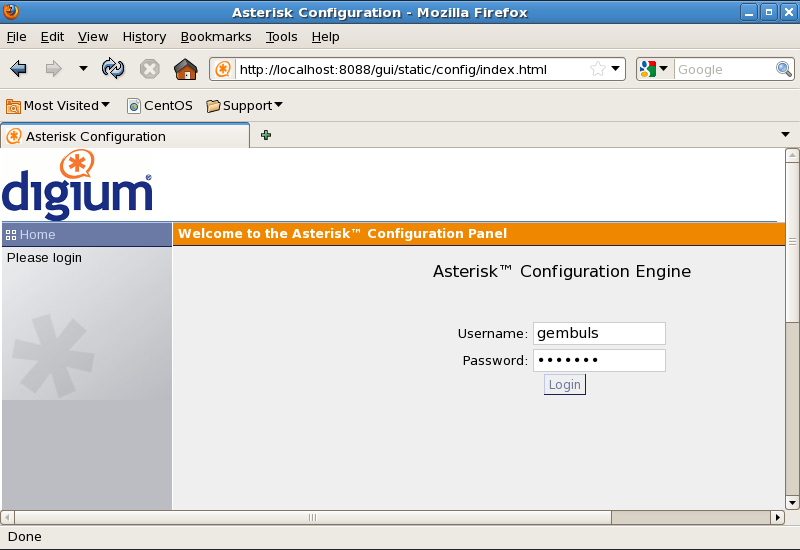
5. Open asterisk-gui on your browser with address:
http://localhost:8088/gui/static/config/index.html
source:
asterisk.org
sourceforge.net


nyolong seko : http://gembuls.wordpress.com/2011/12/28/how-to-install-asterisk-gui/

Saturday, 6 July 2013

Daftar Nomor Awalan Operator Seluler GSM/CDMA

Daftar Nomor Awalan Operator Seluler GSM/CDMA dan Kode Wilayah Telepon SeIndonesia

Untuk memberikan informasi tambahan bagi pembaca blog,
terutama yang ingin mendapatkan nomor depan / nomor prefix
setiap operator GSM dan CDMA , maka di artikel kali ini, saya ingin
sharing-kan list / daftar nomor depan semua operator GSM dan
CDMA yang tersebar di Indonesia. Terdapat nomor prefix operator
terkenal sampai provider yang belum ternama. Ada Telkomsel,
XL, Indosat Mentari dan IM3, kartu Fren, kartu Smart dan lain
sebagainya.Inilah kumpulan daftar nomor depan / nomor prefix
operator selular di Indonesia:
Nomor awal Produk Penyedia
0811 KartuHALO Telkomsel
0812 SimPATI, KartuHALO Telkomsel
0813 SimPATI, KartuHALO Telkomsel
0814 Indosat 3,5G Broadband Indosat (IndosatM2)
0815 Mentari lama, Matrix Indosat
0816 Mentari, Matrix Indosat
0817 XL Prabayar, XL Pascabayar XL Axiata
0818 XL Prabayar, XL Pascabayar XL Axiata
0819 XL Prabayar, XL Pascabayar XL Axiata
0821 SimPATI Freedom Telkomsel
0822 SimPATI (Kartu Facebook) Telkomsel
0823 Kartu As[1] Telkomsel
0828 Ceria Sampoerna Telekom
0831 Axis AXIS Telekom Indonesia
0838 Axis AXIS Telekom Indonesia
0852 Kartu As Telkomsel
0853 Kartu As (Kartu Prima) Telkomsel
0855 Matrix Auto Indosat
0856 IM3 Indosat
0857 IM3 Indosat
0858 Mentari Indosat
0859 XL Prabayar, XL Pascabayar XL Axiata
08681 ByRU PSN/ACeS
0877 XL Prabayar, Hauraa XL Axiata
0878 XL Prabayar XL Axiata
0879 XL Prabayar XL Axiata
0881 smartfren Smartfren Telecom
0882 smartfren Smartfren Telecom
0883 Smartfren Smartfren Telecom
0884 Smartfren Smartfren Telecom
0887 smartfren Smartfren Telecom
0888 smartfren Smartfren Telecom
0889 smartfren Smartfren Telecom
0896 3 Hutchison Charoen Pokphand Telecom
0897 3 Hutchison Charoen Pokphand Telecom
0898 3 Hutchison Charoen Pokphand Telecom
0899 3 Hutchison Charoen Pokphand Telecom
Sumber : http://id.wikipedia.org/wiki/Daftar_produk_telekomunikasi_di_Indonesia

Seperti halnya pada kode telepon tetap di tiap daerah di Indonesia, maka setiap perusahaan seluler pun menetapkan kode untuk tiap daerah tersebut. Daftar di bawah ini adalah daftar kode wilayah di tiap nomor seluler yang terdapat di setiap perusahaan jasa telekomunikasi.
Rata-rata setiap perusahaan telepon seluler menetapkan angka ke-5, 6 dan/atau ke-7 sebagai kode wilayah asal nomor tersebut, seperti contoh 0811-10-xxxx, dimana 0811 merupakan kode dari Telkomsel, angka 10 kode wilayah Jakarta, dan xxxx merupakan nomor seluler tersebut.
Daftar :

Aceh

0627 - Kota Subulussalam
0629 - Kutacane (Kabupaten Aceh Tenggara)
0641 - Kota Langsa
0642 - Blang Kejeren (Kabupaten Gayo Lues)
0643 - Takengon (Kabupaten Aceh Tengah)
0644 - Bireuen (Kabupaten Bireuen)
0645 - Kota Lhokseumawe
0646 - Idi (Kabupaten Aceh Timur)
0650 - Sinabang (Kabupaten Simeulue)
0651 - Kota Banda Aceh - Jantho (Kabupaten Aceh Besar) - Lamno (Kabupaten Aceh Jaya)
0652 - Kota Sabang
0653 - Sigli (Kabupaten Pidie)
0654 - Calang (Kabupaten Aceh Jaya)
0655 - Meulaboh (Kabupaten Aceh Barat)
0656 - Tapaktuan (Kabupaten Aceh Selatan)
0657 - Bakongan (Kabupaten Aceh Selatan)
0658 - Singkil (Kabupaten Aceh Singkil)
0659 - Blangpidie (Kabupaten Aceh Barat Daya)
global.net ( karanganyar . kebumen 551449 )

Sumatera Utara

061 — Kota Medan — Kota Binjai — Stabat (Kabupaten Langkat)
0620 — Pangkalan Brandan (Kabupaten Langkat)
0621 — Kota Tebing Tinggi
0622 — Kota Pematangsiantar
0623 — Kisaran (Kabupaten Asahan) — Kota Tanjung Balai
0624 — Rantau Prapat (Kabupaten Labuhanbatu)
0625 — Parapat (Kabupaten Simalungun)
0626 — Pangururan (Kabupaten Samosir)
0627 — Sidikalang (Kabupaten Dairi) — Salak (Kabupaten Pakpak Bharat)
0628 — Kabanjahe (Kabupaten Karo)
0630 — Teluk Dalam (Kabupaten Nias Selatan)
0631 — Kota Sibolga
0632 — Balige (Kabupaten Toba Samosir)
0633 — Tarutung (Kabupaten Tapanuli Utara)
0634 — Kota Padang Sidempuan
0635 — Gunung Tua (Kabupaten Padang Lawas Utara)
0636 — Panyabungan (Kabupaten Mandailing Natal)
0638 — Barus (Kabupaten Tapanuli Tengah)
0639 — Kota Gunung Sitoli

Sumatera Barat

0751 — Kota Padang — Kota Pariaman
0752 — Kota Bukittinggi — Kota Padang Panjang — Kota Payakumbuh — Batusangkar (Kabupaten Tanah Datar)
0753 — Lubuk Sikaping (Kabupaten Pasaman)
0754 — Kota Sawahlunto
0755 — Kota Solok — Kabupaten Solok Selatan — Alahan Panjang (Kabupaten Solok)
0756 — Painan (Kabupaten Pesisir Selatan)
0757 — Balai Selasa (Kabupaten Agam)
0759 — Tuapejat (Kabupaten Kepulauan Mentawai)
Riau
0760 — Teluk Kuantan (Kabupaten Kuantan Singingi)
0761 — Kota Pekanbaru — Pangkalan Kerinci (Kabupaten Pelalawan)
0762 — Bangkinang (Kabupaten Kampar)
0763 — Selatpanjang (Kabupaten Bengkalis)
0764 — Siak Sri Indrapura (Kabupaten Siak)
0765 — Kota Dumai — Duri (Kabupaten Bengkalis)
0766 — Bengkalis (Kabupaten Bengkalis)
0767 — Bagan Siapi-api (Kabupaten Rokan Hilir)
0768 — Tembilahan (Kabupaten Indragiri Hilir)
0769 — Rengat - Air Molek (Kabupaten Indragiri Hulu)

Kepulauan Riau

0771 — Kota Tanjung Pinang
0772 — Tarempa (Kabupaten Kepulauan Anambas)
0773 — Ranai (Kabupaten Natuna)
0776 — Dabosingkep (Kabupaten Lingga)
0777 — Tanjung Balai Karimun (Kabupaten Karimun)
0778 — Kota Batam
0779 — Tanjungbatu (Kabupaten Karimun)

Jambi

0740 — Mendahara - Muara Sabak (Kabupaten Tanjung Jabung Timur)
0741 — Kota Jambi
0742 — Kualatungkal (Kabupaten Tanjung Jabung Barat)
0743 — Muara Bulian (Kabupaten Batanghari)
0744 — Muara Tebo (Kabupaten Tebo)
0745 — Sarolangun (Kabupaten Sarolangun)
0746 — Bangko (Kabupaten Merangin)
0747 — Muarabungo (Kabupaten Bungo)
0748 — Kota Sungai Penuh

Sumatera Selatan

0711 — Kota Palembang — Pangkalan Balai - Betung (Kabupaten Banyuasin) — Indralaya (Kabupaten Ogan Ilir)
0712 — Kayu Agung (Kabupaten Ogan Komering Ilir)
0713 — Kota Prabumulih
0714 — Sekayu (Kabupaten Musi Banyuasin)
0730 — Kota Pagar Alam
0731 — Lahat (Kabupaten Lahat)
0733 — Kota Lubuklinggau — Pendopo (Kabupaten Lahat)
0734 — Muara Enim (Kabupaten Muara Enim)
0735 — Baturaja (Kabupaten Ogan Komering Ulu)

Kepulauan Bangka Belitung

0715 — Belinyu (Kabupaten Bangka)
0716 — Muntok (Kabupaten Bangka Barat)
0717 — Kota Pangkal Pinang — Sungailiat (Kabupaten Bangka)
0718 — Koba (Kabupaten Bangka Tengah) — Toboali (Kabupaten Bangka Selatan)
0719 — Manggar (Kabupaten Belitung Timur) — Tanjung Pandan (Kabupaten Belitung)

Bengkulu

0732 — Curup (Kabupaten Rejang Lebong)
0736 — Kota Bengkulu — Lais (Kabupaten Bengkulu Utara)
0737 — Arga Makmur (Kabupaten Bengkulu Utara) — Mukomuko (Kabupaten Mukomuko)
0738 — Muara Aman (Kabupaten Lebong)
0739 — Bintuhan (Kabupaten Kaur) — Kota Manna (Kabupaten Bengkulu Selatan)

Lampung

0721 — Kota Bandar Lampung
0722 — Kota Agung (Kabupaten Tanggamus)
0723 — Blambangan Umpu (Kabupaten Way Kanan)
0724 — Kotabumi (Kabupaten Lampung Utara)
0725 — Kota Metro
0726 — Menggala (Kabupaten Tulang Bawang)
0727 — Kalianda (Kabupaten Lampung Selatan)
0728 — Kota Liwa (Kabupaten Lampung Barat)
0729 — Pringsewu (Kabupaten Pringsewu)

DKI Jakarta

021 — Kepulauan Seribu — Jakarta Barat — Jakarta Pusat — Jakarta Selatan — Jakarta Timur — Jakarta Utara

Banten

021 — Tigaraksa (Kabupaten Tangerang) — Kota Tangerang — Kota Tangerang Selatan
0252 — Rangkasbitung (Kabupaten Lebak)
0253 — Pandeglang - Labuan (Kabupaten Pandeglang)
0254 — Kota Serang — Kabupaten Serang — Merak (Kota Cilegon)
0257 — Pasauran (Kabupaten Serang)

Jawa Barat

021 — Kota Bekasi — Cikarang (Kabupaten Bekasi) — Kota Depok — Cibinong (Kabupaten Bogor)
022 — Kota Bandung — Kota Cimahi — Soreang (Kabupaten Bandung) — Lembang - Ngamprah (Kabupaten Bandung Barat)
0231 — Kota Cirebon — Sumber - Losari (Kabupaten Cirebon)
0232 — Kabupaten Kuningan
0233 — Kadipaten (Kabupaten Majalengka)
0234 — Jatibarang (Kabupaten Indramayu)
0251 — Kota Bogor
0260 — Pamanukan (Kabupaten Subang)
0261 — Kabupaten Sumedang
0262 — Kabupaten Garut
0263 — Kabupaten Cianjur
0264 — Kabupaten Purwakarta
0265 — Kota Tasikmalaya — Kadipaten - Singaparna (Kabupaten Tasikmalaya) — Kota Banjar — Ciamis - Pangandaran (Kabupaten Ciamis)
0266 — Kota Sukabumi — Palabuhanratu (Kabupaten Sukabumi)
0267 — Kabupaten Karawang

Jawa Tengah

024 - Semarang, Ungaran
0271 - Surakarta (Solo), Kartasura, Sukoharjo, Karanganyar, Sragen
0272 - Klaten
0273 - Wonogiri
0275 - Purworejo,Kutoarjo
0276 - Boyolali
0280 - Majenang, Sidareja (Kabupaten Cilacap bagian barat)
0281 - Purwokerto, Banyumas, Purbalingga
0282 - Cilacap (bagian timur)
0283 - Tegal, Slawi, Brebes
0284 - Pemalang
0285 - Pekalongan, Batang (bagian barat)
0286 - Banjarnegara, Wonosobo
0287 - Kebumen, Gombong
0289 - Bumiayu (Kabupaten Brebes bagian selatan)
0291 - Demak, Jepara, Kudus
0292 - Purwodadi
0293 - Magelang, Mungkid, Temanggung
0294 - Kendal, Kaliwungu, Weleri, Batang (bagian timur)
0295 - Pati, Rembang, Lasem
0296 - Blora, Cepu
0297 - Karimun Jawa
0298 - Salatiga, Ambarawa (Kabupaten Semarang bagian tengah dan selatan)

Daerah Istimewa Yogyakarta

0274 - Yogyakarta, Sleman, Wates, Bantul, Wonosari

Jawa Timur

031 - Surabaya, Gresik, Sidoarjo, Bangkalan
0321 - Mojokerto, Jombang
0322 - Lamongan, Babat
0323 - Sampang
0324 - Pamekasan
0325 - Sangkapura (Bawean)
0327 - Kepulauan Kangean, Kepulauan Masalembu
0328 - Sumenep
0331 - Jember
0332 - Bondowoso, Sukosari, Prajekan
0333 - Banyuwangi, Muncar
0334 - Lumajang
0335 - Probolinggo, Kraksaan
0336 - Ambulu, Puger (Kabupaten Jember bagian selatan)
0338 - Situbondo, Besuki
0341 - Malang, Kepanjen, Batu
0342 - Blitar, Wlingi
0343 - Pasuruan, Pandaan, Gempol
0351 - Madiun, Caruban, Magetan, Ngawi
0352 - Ponorogo
0353 - Bojonegoro
0354 - Kediri, Pare
0355 - Tulungagung, Trenggalek
0356 - Tuban
0357 - Pacitan
0358 - Nganjuk, Kertosono

Bali

0361 - Denpasar, Gianyar, Kuta, Tabanan, Tampaksiring, Ubud
0362 - Singaraja
0363 - Amlapura
0365 - Negara, Gilimanuk
0366 - Klungkung, Kintamani
0368 - Baturiti

Nusa Tenggara Barat

0364 - Kota Mataram
0370 - Mataram, Praya
0371 - Sumbawa
0372 - Alas, Taliwang
0373 - Dompu
0374 - Bima
0376 - Selong

Nusa Tenggara Timur

0380 - Kupang, Baa (Roti)
0381 - Ende
0382 - Maumere
0383 - Larantuka
0384 - Bajawa
0385 - Labuhanbajo, Ruteng
0386 - Kalabahi
0387 - Waingapu, Waikabubak
0388 - Kefamenanu, Soe
0389 - Atambua

Kalimantan Barat

0561 - Pontianak, Mempawah
0562 - Sambas, Singkawang, Bengkayang
0563 - Ngabang
0564 - Sanggau
0565 - Sintang
0567 - Putussibau
0568 - Nanga Pinoh
0534 - Ketapang

Kalimantan Tengah

0513 - Kuala Kapuas, Pulang Pisau
0519 - Muara Teweh
0522 - Ampah (Dusun Tengah, Barito Timur)
0525 - Buntok
0526 - Tamiang Layang
0528 - Purukcahu
0531 - Sampit
0532 - Pangkalan Bun, Kumai
0534 - Kendawangan
0536 - Palangkaraya, Kasongan
0537 - Kuala Kurun
0538 - Kuala Pembuang
0539 - Kuala Kuayan (Mentaya Hulu, Kotawaringin Timur)

Kalimantan Selatan

0511 - Banjarmasin, Banjarbaru, Martapura, Marabahan
0512 - Pelaihari
0517 - Kandangan, Barabai, Rantau, Negara
0518 - Kotabaru, Batulicin
0526 - Tanjung
0527 - Amuntai

Kalimantan Timur

0541 - Samarinda, Tenggarong
0542 - Balikpapan
0543 - Tanah Grogot
0545 - Melak
0548 - Bontang
0549 - Sangatta
0551 - Tarakan
0552 - Tanjungselor
0553 - Malinau
0554 - Tanjung Redeb
0556 - Nunukan

Sulawesi Utara

0430 - Amurang
0431 - Manado, Tomohon, Tondano
0432 - Tahuna
0434 - Kotamobagu
0438 - Bitung

Gorontalo

0435 - Gorontalo, Limboto
0443 - Marisa

Sulawesi Tengah

0450 - Parigi
0451 - Palu
0452 - Poso
0453 - Tolitoli
0457 - Donggala
0458 - Tentena
0461 - Luwuk
0462 - Banggai
0463 - Bunta
0464 - Ampana
0465 - Kolonedale

Sulawesi Barat

0422 - Majene
0426 - Mamuju
0428 - Polewali

Sulawesi Selatan

0411 - Makassar, Maros, Sungguminasa
0413 - Bulukumba
0414 - Bantaeng (Selayar)
0417 - Malino
0418 - Takalar
0419 - Janeponto
0420 - Enrekang
0421 - Parepare, Pinrang
0422 - Manene
0423 - Makale, Rantepao
0427 - Barru
0428 - Wonomulyo
0471 - Palopo
0472 - Pitumpanua
0473 - Masamba
0474 - Malili
0475 - Soroako
0481 - Watampone
0482 - Sinjai
0484 - Watansoppeng
0485 - Sengkang

Sulawesi Tenggara

0401 - Kendari
0402 - Baubau
0403 - Raha
0404 - Wanci
0405 - Kolaka
0408 - Unaaha

Maluku

0910 - Bandaneira
0911 - Ambon
0913 - Namlea
0914 - Masohi
0915 - Bula
0916 - Tual
0917 - Dobo
0918 - Saumlaku
0921 - Soasiu
0922 - Jailolo
0923 - Morotai
0924 - Tobelo
0927 - Labuha
0929 - Sanana
0931 - Saparua

Maluku Utara

Lihat Maluku

Papua Barat

Lihat Papua

Papua

0901 - Timika, Tembagapura
0902 - Agats (Asmat)
0951 - Sorong
0952 - Teminabuan
0955 - Bintuni
0956 - Fakfak
0957 - Kaimana
0966 - Sarmi
0967 - Jayapura, Abepura
0969 - Wamena
0971 - Merauke
0975 - Tanahmerah
0980 - Ransiki
0981 - Biak
0983 - Serui
0984 - Nabire
0985 - Nabire
0986 - Manokwari

Seluler

Lihat Kode Area Seluler GSM dan CDMA untuk kode wilayah masing-masing telepon seluler. Empat angka pertama pada nomor telepon seluler merujuk pada operator dari
telepon seluler tersebut, seperti:
0811, 0812, 0813, 0852, 0853 - Telkomsel
0814, 0815, 0816, 0855, 0856, 0857, 0858 - Indosat
0817, 0818, 0819, 0859, 0877, 0878 -XL
0831, 0832, 0838 - AXIS
0828 - Sampoerna Telekom
Untuk kode negara sedunia klik : id.m.wikipedia.org/wiki/Daftar_kode_telepon_negara_di_dunia
0881, 0882 - Smart
0888 - Mobile-8
0899, 0898, 0896 - 3

Source : http://www.hi-techmall.org/soft/blog/daftar-nomor-awalan-operator-seluler-gsmcdma-kode-wilayah-telepon-seindonesia